

ThunderSync™ — Pull Photos Off Any Camera, Card, or Phone in Seconds
Get Every Photo Off Your Camera, Phone, and Cards — From One Pocket-Sized Reader
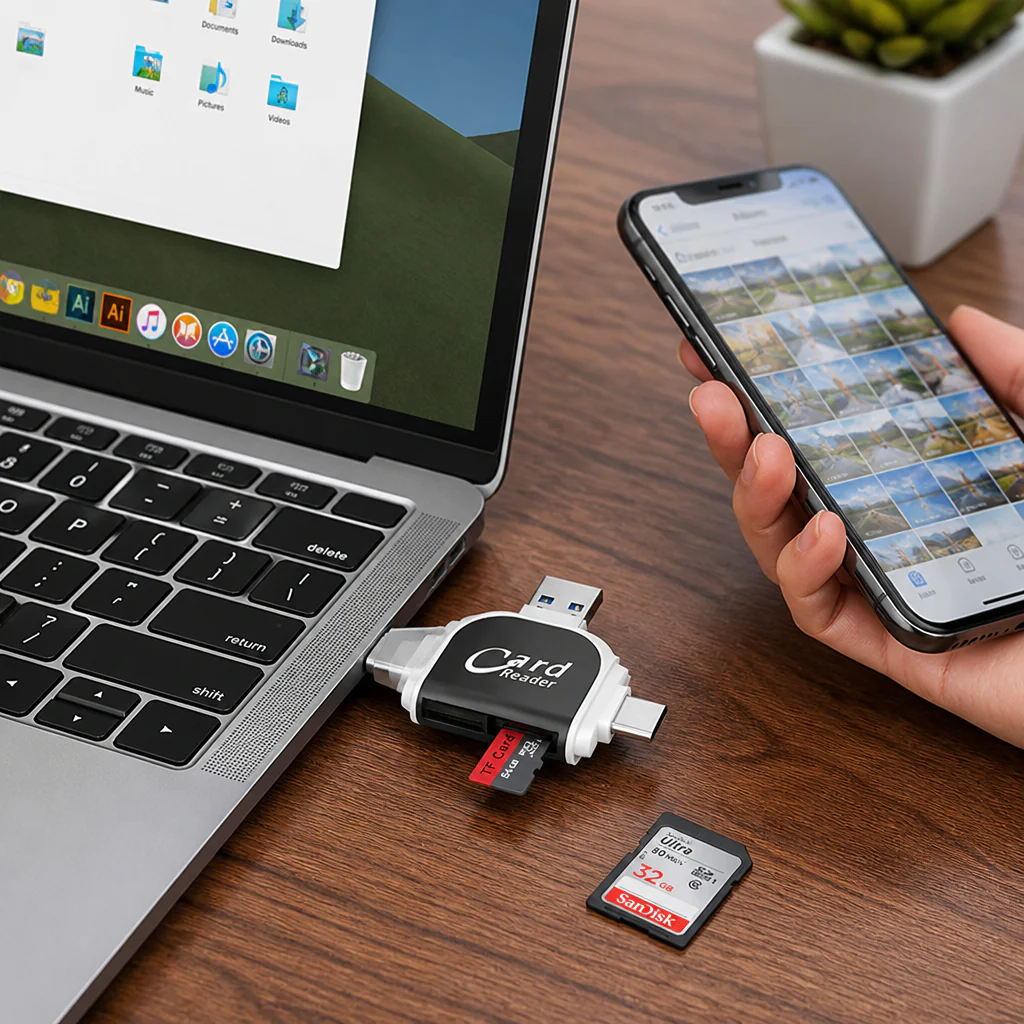
Still emailing photos to yourself, hunting for the right cable, or waiting on a laptop just to move a few files? ThunderSync™ is a 6-in-1 card reader that plugs straight into your iPhone, iPad, Android, Mac, or PC — pop in an SD or Micro SD card and your files show up in seconds. No app to download, no adapter drawer to dig through. One small reader does the job of a whole tangle of cables.

Stop Juggling Cables, Adapters, and Sketchy Apps
You've got photos trapped on a camera's SD card, a phone with no card slot, and a reader that only fits one kind of port. Most cheap readers force you to install a clunky app, then quit working after the next phone update. ThunderSync™ skips all of it — four connector tips plus two card slots in one body, so the card you have always fits the device you're holding.
➤ Plug Into Any Device You Own — No Adapter Hunting.: USB-A, USB-C, Micro USB, and Lightning are built right into one reader, so it connects to iPhones, iPads, Android OTG phones, laptops, and desktops across iOS, macOS, Windows, and Linux. One tool, every port.
➤ Pull a Full Card Off in Seconds, Not Minutes.: USB 3.0 transfer rates up to 5 Gbps move a card stuffed with photos and 4K video fast — no spinning loaders, no half-finished copies that fail at 90%.
➤ Charge Your iPhone While You Move Files.: ThunderSync™ reads SD and Micro SD cards up to 400GB and powers your Apple device mid-transfer, so a low battery never stops you halfway through an import.

Meet ThunderSync™: Six Ports and Two Card Slots in One Tiny Reader
Pick the tip that matches your device — USB-A, USB-C, Micro USB, or Lightning — slide your SD or Micro SD card into the slot, and your files open right up. No driver disc, no companion app, no setup screen. It's small enough to live in a camera bag, a pocket, or a laptop sleeve, so the reader is there the moment you need it.
Most readers only fit one port and choke on big cards or unfamiliar systems. ThunderSync™ handles giant 400GB cards and works across iOS 8 and up, Android OTG, Windows, macOS, and Linux — and keeps your Apple device charged while it copies. That's the whole reason people stop buying a new adapter every time they switch phones.

Why Photographers and "Phone-Full-of-Photos" People Keep One in Their Bag
The people who reach for ThunderSync™ most are the ones tired of the laptop detour — shooters offloading a card between locations, parents pulling a year of clips off an old phone, anyone who just wants their shots on their phone now. "I shoot on a real camera and hated plugging into my laptop every time. Now I pull the SD card, tap it into my phone, and the photos are in my camera roll before my coffee's cold." — Marcus T.

Move Files Your Way — No Computer, No Cables, No Waiting
✓ Works With Your iPhone, iPad, Android, Mac, and PC.: One reader bridges every device you carry — iOS, macOS, Windows, Linux, and Android OTG — with no extra dongle to buy.
✓ Reads Big 400GB SD and Micro SD Cards.: Whether it's a memory card from your camera, drone, or dash cam, ThunderSync™ opens it and moves the files at up to 5 Gbps.
✓ No App, No Setup — Just Plug In and Go.: Nothing to install and nothing to break after an update. Plug it in, your card shows up, you're done.
How ThunderSync™ Works — Three Simple Moves
Step 1: Plug ThunderSync™ into your device using the matching port — USB-A, USB-C, Micro USB, or Lightning. No adapters, no headaches.
Step 2: Slide in your SD or Micro SD card. Your files pop up instantly, ready to preview, copy, or organize.
Step 3: Move what you want. Apple users can charge the phone at the same time, so nothing slows you down.

ThunderSync™ vs. The Usual Workarounds
| ThunderSync™ | Other Card Readers | Cables + Laptop | |
|---|---|---|---|
| Fits every device | ✅ 4 ports in one | ❌ One port only | ❌ Computer required |
| Transfer speed | ✅ Up to 5 Gbps | ❌ Slow, drops out | ❌ Round-trip hassle |
| App / setup | ✅ None needed | ❌ Sketchy app | ❌ Find the cable |
| Charge while transferring | ✅ Yes (Apple) | ❌ No | ❌ No |
ThunderSync™ Specs That Power Every Detail
- Connector Tips: USB-A (USB 3.0), USB Type-C, Micro USB, Lightning 8-pin
- Systems Supported: iOS 8+, macOS, Windows, Linux, Android OTG
- Colors: Black, Pink
- Memory Card Support: SD and Micro SD (TF) cards up to 400GB
Got Questions? Here's How ThunderSync™ Takes the Hassle Out of File Transfers
Will ThunderSync™ work with my iPhone or iPad?
Yes. The built-in Lightning tip connects to iPhones and iPads running iOS 8 or newer, and it charges your device during transfers so the battery never slows you down.
Do I need to download an app?
No. ThunderSync™ is plug-and-play with no software to install, so there's nothing to set up and nothing that breaks after a phone update.
What size memory cards can it handle?
It reads both SD and Micro SD (TF) cards up to 400GB — plenty for a camera, drone, dash cam, or a phone packed with photos and video.
Is it compatible with Android and computers?
Yes. It supports OTG-enabled Android phones plus Windows, macOS, and Linux desktops and laptops, so you can move files wherever you're working.
How fast is the transfer?
USB 3.0 speeds up to 5 Gbps move big batches of photos and 4K clips in seconds. Just plug in, insert your card, and copy.

ThunderSync™ — Take Full Control of Your Files, Backed for 30 Days
No more laptop detours, no more cable drawer, no more "which adapter do I need" guessing. ThunderSync™ fits every device you own, reads cards up to 400GB at USB 3.0 speeds, and charges your Apple gear while it works. Try it on your own setup — if it doesn't pull your files faster and easier than your current method, send it back within 30 days for a full refund. The only thing you've got to lose is the wait.
Original: $39.99
-70%$39.99
$12.00Product Information
Product Information
Shipping & Returns
Shipping & Returns
Description
Get Every Photo Off Your Camera, Phone, and Cards — From One Pocket-Sized Reader
Still emailing photos to yourself, hunting for the right cable, or waiting on a laptop just to move a few files? ThunderSync™ is a 6-in-1 card reader that plugs straight into your iPhone, iPad, Android, Mac, or PC — pop in an SD or Micro SD card and your files show up in seconds. No app to download, no adapter drawer to dig through. One small reader does the job of a whole tangle of cables.
Stop Juggling Cables, Adapters, and Sketchy Apps
You've got photos trapped on a camera's SD card, a phone with no card slot, and a reader that only fits one kind of port. Most cheap readers force you to install a clunky app, then quit working after the next phone update. ThunderSync™ skips all of it — four connector tips plus two card slots in one body, so the card you have always fits the device you're holding.
➤ Plug Into Any Device You Own — No Adapter Hunting.: USB-A, USB-C, Micro USB, and Lightning are built right into one reader, so it connects to iPhones, iPads, Android OTG phones, laptops, and desktops across iOS, macOS, Windows, and Linux. One tool, every port.
➤ Pull a Full Card Off in Seconds, Not Minutes.: USB 3.0 transfer rates up to 5 Gbps move a card stuffed with photos and 4K video fast — no spinning loaders, no half-finished copies that fail at 90%.
➤ Charge Your iPhone While You Move Files.: ThunderSync™ reads SD and Micro SD cards up to 400GB and powers your Apple device mid-transfer, so a low battery never stops you halfway through an import.
Meet ThunderSync™: Six Ports and Two Card Slots in One Tiny Reader
Pick the tip that matches your device — USB-A, USB-C, Micro USB, or Lightning — slide your SD or Micro SD card into the slot, and your files open right up. No driver disc, no companion app, no setup screen. It's small enough to live in a camera bag, a pocket, or a laptop sleeve, so the reader is there the moment you need it.
Most readers only fit one port and choke on big cards or unfamiliar systems. ThunderSync™ handles giant 400GB cards and works across iOS 8 and up, Android OTG, Windows, macOS, and Linux — and keeps your Apple device charged while it copies. That's the whole reason people stop buying a new adapter every time they switch phones.
Why Photographers and "Phone-Full-of-Photos" People Keep One in Their Bag
The people who reach for ThunderSync™ most are the ones tired of the laptop detour — shooters offloading a card between locations, parents pulling a year of clips off an old phone, anyone who just wants their shots on their phone now. "I shoot on a real camera and hated plugging into my laptop every time. Now I pull the SD card, tap it into my phone, and the photos are in my camera roll before my coffee's cold." — Marcus T.
Move Files Your Way — No Computer, No Cables, No Waiting
✓ Works With Your iPhone, iPad, Android, Mac, and PC.: One reader bridges every device you carry — iOS, macOS, Windows, Linux, and Android OTG — with no extra dongle to buy.
✓ Reads Big 400GB SD and Micro SD Cards.: Whether it's a memory card from your camera, drone, or dash cam, ThunderSync™ opens it and moves the files at up to 5 Gbps.
✓ No App, No Setup — Just Plug In and Go.: Nothing to install and nothing to break after an update. Plug it in, your card shows up, you're done.
How ThunderSync™ Works — Three Simple Moves
Step 1: Plug ThunderSync™ into your device using the matching port — USB-A, USB-C, Micro USB, or Lightning. No adapters, no headaches.
Step 2: Slide in your SD or Micro SD card. Your files pop up instantly, ready to preview, copy, or organize.
Step 3: Move what you want. Apple users can charge the phone at the same time, so nothing slows you down.
ThunderSync™ vs. The Usual Workarounds
| ThunderSync™ | Other Card Readers | Cables + Laptop | |
|---|---|---|---|
| Fits every device | ✅ 4 ports in one | ❌ One port only | ❌ Computer required |
| Transfer speed | ✅ Up to 5 Gbps | ❌ Slow, drops out | ❌ Round-trip hassle |
| App / setup | ✅ None needed | ❌ Sketchy app | ❌ Find the cable |
| Charge while transferring | ✅ Yes (Apple) | ❌ No | ❌ No |
ThunderSync™ Specs That Power Every Detail
- Connector Tips: USB-A (USB 3.0), USB Type-C, Micro USB, Lightning 8-pin
- Systems Supported: iOS 8+, macOS, Windows, Linux, Android OTG
- Colors: Black, Pink
- Memory Card Support: SD and Micro SD (TF) cards up to 400GB
Got Questions? Here's How ThunderSync™ Takes the Hassle Out of File Transfers
Will ThunderSync™ work with my iPhone or iPad?
Yes. The built-in Lightning tip connects to iPhones and iPads running iOS 8 or newer, and it charges your device during transfers so the battery never slows you down.
Do I need to download an app?
No. ThunderSync™ is plug-and-play with no software to install, so there's nothing to set up and nothing that breaks after a phone update.
What size memory cards can it handle?
It reads both SD and Micro SD (TF) cards up to 400GB — plenty for a camera, drone, dash cam, or a phone packed with photos and video.
Is it compatible with Android and computers?
Yes. It supports OTG-enabled Android phones plus Windows, macOS, and Linux desktops and laptops, so you can move files wherever you're working.
How fast is the transfer?
USB 3.0 speeds up to 5 Gbps move big batches of photos and 4K clips in seconds. Just plug in, insert your card, and copy.
ThunderSync™ — Take Full Control of Your Files, Backed for 30 Days
No more laptop detours, no more cable drawer, no more "which adapter do I need" guessing. ThunderSync™ fits every device you own, reads cards up to 400GB at USB 3.0 speeds, and charges your Apple gear while it works. Try it on your own setup — if it doesn't pull your files faster and easier than your current method, send it back within 30 days for a full refund. The only thing you've got to lose is the wait.