

FluxWay™ — Ditch the Cable and Auto-Link Wireless CarPlay & Android Auto
Cut the Cord. Experience Wireless CarPlay That Connects Automatically Every Trip
Your Lightning port is wearing thin, your cable’s frayed at the plug, and you’re tired of plugging in every time you get behind the wheel. FluxWay™ Wireless Adapter transforms your car’s existing wired CarPlay or Android Auto into a genuinely wireless system using Bluetooth 5.0 + 2.45 GHz WiFi — it auto-pairs the moment your car starts, no app, no remote needed. Compatible with iPhone 6 or newer (iOS 10+), Android 11+ devices, and over 800 car models already equipped with wired CarPlay or Android Auto.

Stop Fumbling with the Cable Every Time You Hit the Road
You grabbed a “better” Lightning cable, but it failed in eight months. The replacement loosens whenever you hit a bump. Your phone’s charging port feels unreliable. And every morning repeats: hunt for the cable, plug it in, wait, fingers crossed CarPlay doesn’t quit Maps before you get home.
➤ Dependable Wireless Connection: Bluetooth 5.0 combined with 2.45 GHz WiFi maintains a strong link through garages, tunnels, and dense city blocks — no audio dropouts, no freezing Maps mid-route.
➤ Auto-Pairs Instantly Every Drive: Enhanced chipset activates as soon as your car powers on and links with the last phone connected — CarPlay or Android Auto launches before you buckle up.
➤ Plug Once, Forget It Forever: Single USB plug, one Bluetooth pairing on your phone, and you’re set — no app installations, no monthly re-pairing, no remote cluttering the glovebox.

How FluxWay™ Communicates with Your Car Without Wires
It uses two radios to do two jobs. Bluetooth 5.0 manages the initial handshake with your phone the second your car starts — quick, energy-efficient, and reliable throughout the cabin. 2.45 GHz WiFi then handles the data-intensive stream: high-quality audio, Maps, voice commands, album artwork — all the traffic that Bluetooth alone can’t handle.
That’s why FluxWay™ keeps the connection solid where cheaper adapters lose it. Music keeps playing as you enter a parking garage. Maps stay smooth under overpasses. Siri and Google Assistant answer immediately. Steering wheel controls, touchscreen inputs, and rotary knobs work just as your carmaker intended.

Why Drivers Quit Plugging Cables After Just One Week with FluxWay™
Most folks who switch have the same realization: after a week or two, they instinctively reach for the cable and realize they haven’t needed to plug in once. The dashboard looks tidier. The charging port stays intact. CarPlay simply… appears. “Honestly feels like my CR-V came wireless from day one. Two weeks in and I’ve totally forgotten what that cable looks like.” — Mark D., 2019 Honda CR-V owner.

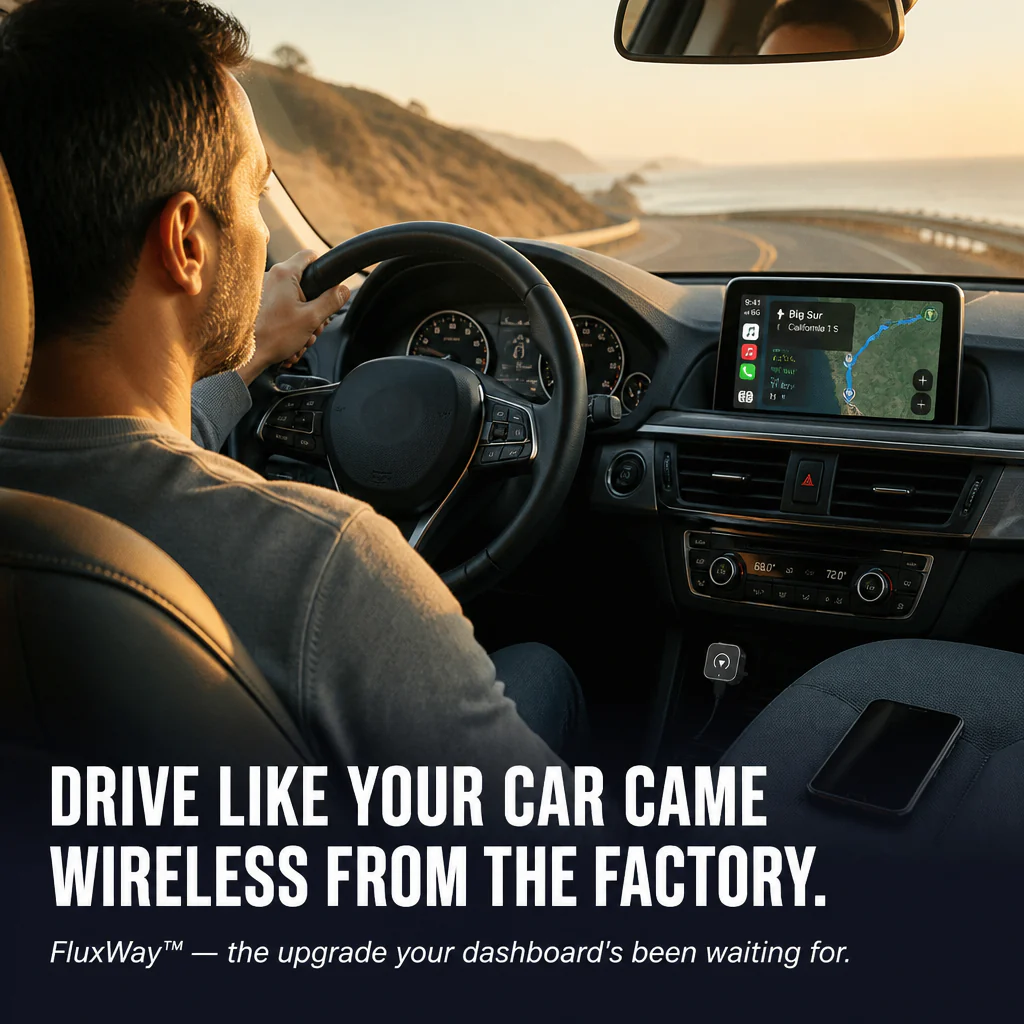
Drive Like Your Car Had Wireless Built In from the Start
✓ Clearer Cabin, No Cable Chaos: No more cords trailing over the gear shift or dangling from the dash mount — your car’s interior looks just as the designers envisioned.
✓ Protects Your Phone’s Charging Port: Each plug-in wears the port down a bit more. Pair once, charge separately when needed, keep the original port safe and sound.
✓ Compatible with Your Current Setup: Siri, Google Assistant, steering wheel controls, touchscreen, rotary knob — every control your car came with still works flawlessly.
Install It Once. Forget It Forever.
Step 1: Plug FluxWay™ into your car’s USB port (USB-C to USB-A cable included for older USB-A dashboards).
Step 2: Pair your phone via Bluetooth one time — takes around 30 seconds, no app needed.
Step 3: Start your car. CarPlay or Android Auto launches automatically from now on. Every journey. No exceptions.

| FluxWay™ Wireless Adapter | Wired CarPlay | Other Wireless Adapters |
|---|---|---|
| Automatically connects every time you start your car | ❌ | ❌ |
| Keeps connection through tunnels & garages | ❌ | ❌ |
| Full Siri, steering wheel, knob & touchscreen compatibility | ✅ | ❌ |
Compact Design, Built to Endure
- Model: Q1M
- Connectivity: Bluetooth 5.0 + 2.45 GHz WiFi
- Housing: Robust ABS case with metallic finish (Silver or Gold)
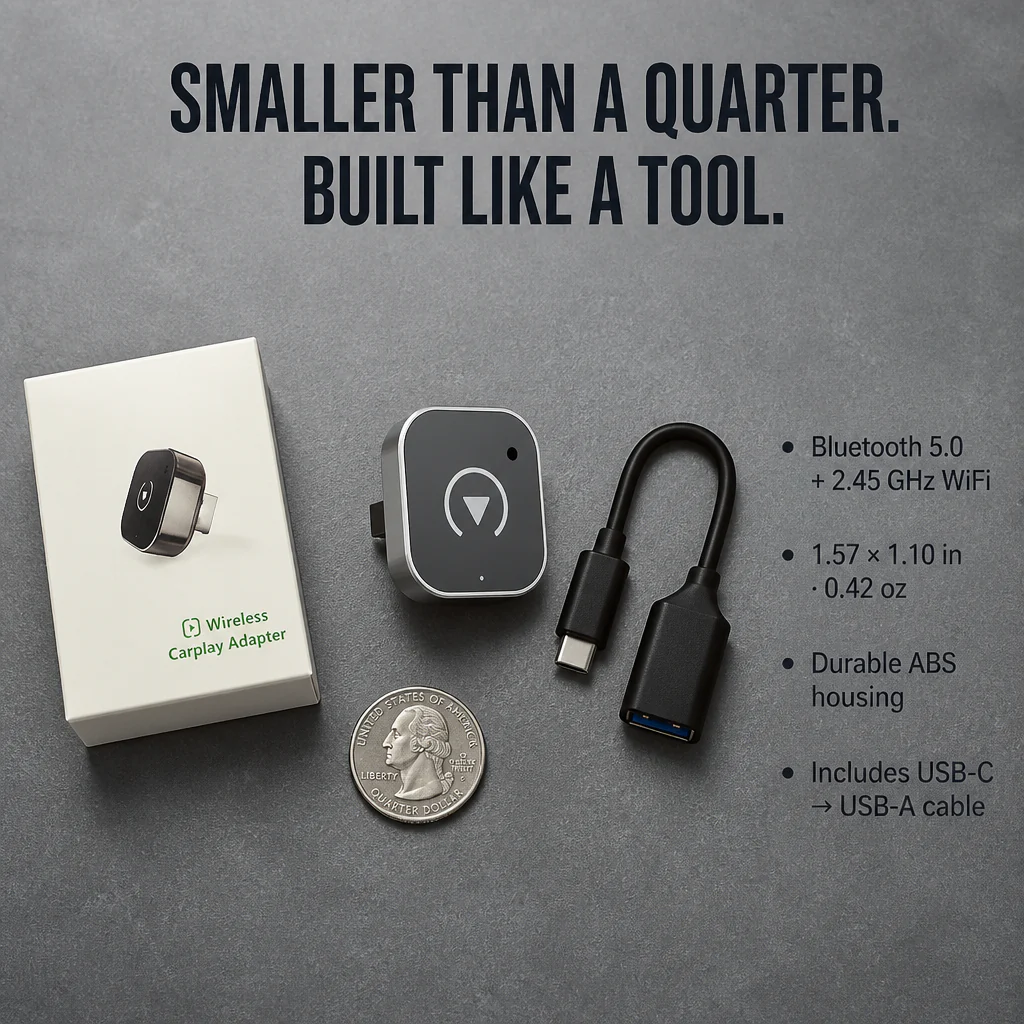
- Size & Weight: 1.57 × 1.10 in; 0.42 oz adapter; Box 4.72 × 3.54 × 0.87 in; 1.06 oz packed
- Included: FluxWay™ Adapter + USB-C to USB-A cable + retail packaging
Questions? Clear Answers Below.
Will this work with my specific vehicle?
If your car supports wired CarPlay or Android Auto, FluxWay™ will too — confirmed with over 800 models. Quick check: plug your phone into your car today with a cable. If CarPlay or Android Auto appears on your dashboard, FluxWay™ can provide wireless functionality. Cars lacking wired CarPlay/Android Auto aren’t compatible.
How fast does it connect when I start the car?
After the initial pairing, FluxWay™ activates the moment your car powers up and connects instantly. CarPlay or Android Auto typically loads before you’ve clicked your seatbelt — no remote or app, no delay.
Will it drain my phone’s battery?
FluxWay™ draws power from your car’s USB port, not your phone. Use a wireless charger pad or cup-holder cable to keep your phone fully charged during the drive.
Is it compatible with both iPhone and Android?
Absolutely. iPhones with iOS 10+ support wireless CarPlay. Android phones running Android 11+ get wireless Android Auto. Same adapter, same box—no need to pick separate versions.
Will my steering wheel buttons and Siri keep working?
Every one. Steering wheel controls, Siri, Google Assistant, touchscreen taps, and rotary knobs function exactly like they did with the cable. The only difference? The cable vanishes.

Make Your Ride Feel Like a 2026 Model—No Trade-In Needed
FluxWay™ is the single upgrade that turns your older car into a wireless-CarPlay vehicle in under five minutes. Plug it in once, pair your phone, and forget the cable ever existed. If FluxWay™ doesn’t auto-connect with your car as promised here, return it for a full refund—no restocking fees or hassle.
Original: $34.99
-70%$34.99
$10.50Product Information
Product Information
Shipping & Returns
Shipping & Returns
Description
Cut the Cord. Experience Wireless CarPlay That Connects Automatically Every Trip
Your Lightning port is wearing thin, your cable’s frayed at the plug, and you’re tired of plugging in every time you get behind the wheel. FluxWay™ Wireless Adapter transforms your car’s existing wired CarPlay or Android Auto into a genuinely wireless system using Bluetooth 5.0 + 2.45 GHz WiFi — it auto-pairs the moment your car starts, no app, no remote needed. Compatible with iPhone 6 or newer (iOS 10+), Android 11+ devices, and over 800 car models already equipped with wired CarPlay or Android Auto.
Stop Fumbling with the Cable Every Time You Hit the Road
You grabbed a “better” Lightning cable, but it failed in eight months. The replacement loosens whenever you hit a bump. Your phone’s charging port feels unreliable. And every morning repeats: hunt for the cable, plug it in, wait, fingers crossed CarPlay doesn’t quit Maps before you get home.
➤ Dependable Wireless Connection: Bluetooth 5.0 combined with 2.45 GHz WiFi maintains a strong link through garages, tunnels, and dense city blocks — no audio dropouts, no freezing Maps mid-route.
➤ Auto-Pairs Instantly Every Drive: Enhanced chipset activates as soon as your car powers on and links with the last phone connected — CarPlay or Android Auto launches before you buckle up.
➤ Plug Once, Forget It Forever: Single USB plug, one Bluetooth pairing on your phone, and you’re set — no app installations, no monthly re-pairing, no remote cluttering the glovebox.
How FluxWay™ Communicates with Your Car Without Wires
It uses two radios to do two jobs. Bluetooth 5.0 manages the initial handshake with your phone the second your car starts — quick, energy-efficient, and reliable throughout the cabin. 2.45 GHz WiFi then handles the data-intensive stream: high-quality audio, Maps, voice commands, album artwork — all the traffic that Bluetooth alone can’t handle.
That’s why FluxWay™ keeps the connection solid where cheaper adapters lose it. Music keeps playing as you enter a parking garage. Maps stay smooth under overpasses. Siri and Google Assistant answer immediately. Steering wheel controls, touchscreen inputs, and rotary knobs work just as your carmaker intended.
Why Drivers Quit Plugging Cables After Just One Week with FluxWay™
Most folks who switch have the same realization: after a week or two, they instinctively reach for the cable and realize they haven’t needed to plug in once. The dashboard looks tidier. The charging port stays intact. CarPlay simply… appears. “Honestly feels like my CR-V came wireless from day one. Two weeks in and I’ve totally forgotten what that cable looks like.” — Mark D., 2019 Honda CR-V owner.
Drive Like Your Car Had Wireless Built In from the Start
✓ Clearer Cabin, No Cable Chaos: No more cords trailing over the gear shift or dangling from the dash mount — your car’s interior looks just as the designers envisioned.
✓ Protects Your Phone’s Charging Port: Each plug-in wears the port down a bit more. Pair once, charge separately when needed, keep the original port safe and sound.
✓ Compatible with Your Current Setup: Siri, Google Assistant, steering wheel controls, touchscreen, rotary knob — every control your car came with still works flawlessly.
Install It Once. Forget It Forever.
Step 1: Plug FluxWay™ into your car’s USB port (USB-C to USB-A cable included for older USB-A dashboards).
Step 2: Pair your phone via Bluetooth one time — takes around 30 seconds, no app needed.
Step 3: Start your car. CarPlay or Android Auto launches automatically from now on. Every journey. No exceptions.
| FluxWay™ Wireless Adapter | Wired CarPlay | Other Wireless Adapters |
|---|---|---|
| Automatically connects every time you start your car | ❌ | ❌ |
| Keeps connection through tunnels & garages | ❌ | ❌ |
| Full Siri, steering wheel, knob & touchscreen compatibility | ✅ | ❌ |
Compact Design, Built to Endure
- Model: Q1M
- Connectivity: Bluetooth 5.0 + 2.45 GHz WiFi
- Housing: Robust ABS case with metallic finish (Silver or Gold)
- Size & Weight: 1.57 × 1.10 in; 0.42 oz adapter; Box 4.72 × 3.54 × 0.87 in; 1.06 oz packed
- Included: FluxWay™ Adapter + USB-C to USB-A cable + retail packaging
Questions? Clear Answers Below.
Will this work with my specific vehicle?
If your car supports wired CarPlay or Android Auto, FluxWay™ will too — confirmed with over 800 models. Quick check: plug your phone into your car today with a cable. If CarPlay or Android Auto appears on your dashboard, FluxWay™ can provide wireless functionality. Cars lacking wired CarPlay/Android Auto aren’t compatible.
How fast does it connect when I start the car?
After the initial pairing, FluxWay™ activates the moment your car powers up and connects instantly. CarPlay or Android Auto typically loads before you’ve clicked your seatbelt — no remote or app, no delay.
Will it drain my phone’s battery?
FluxWay™ draws power from your car’s USB port, not your phone. Use a wireless charger pad or cup-holder cable to keep your phone fully charged during the drive.
Is it compatible with both iPhone and Android?
Absolutely. iPhones with iOS 10+ support wireless CarPlay. Android phones running Android 11+ get wireless Android Auto. Same adapter, same box—no need to pick separate versions.
Will my steering wheel buttons and Siri keep working?
Every one. Steering wheel controls, Siri, Google Assistant, touchscreen taps, and rotary knobs function exactly like they did with the cable. The only difference? The cable vanishes.
Make Your Ride Feel Like a 2026 Model—No Trade-In Needed
FluxWay™ is the single upgrade that turns your older car into a wireless-CarPlay vehicle in under five minutes. Plug it in once, pair your phone, and forget the cable ever existed. If FluxWay™ doesn’t auto-connect with your car as promised here, return it for a full refund—no restocking fees or hassle.