


CircuitSense™ — Detect Dead Inductors Instantly Without Touching a Soldering Iron
Identify a Dead Inductor Instantly — No Need to Open the Board
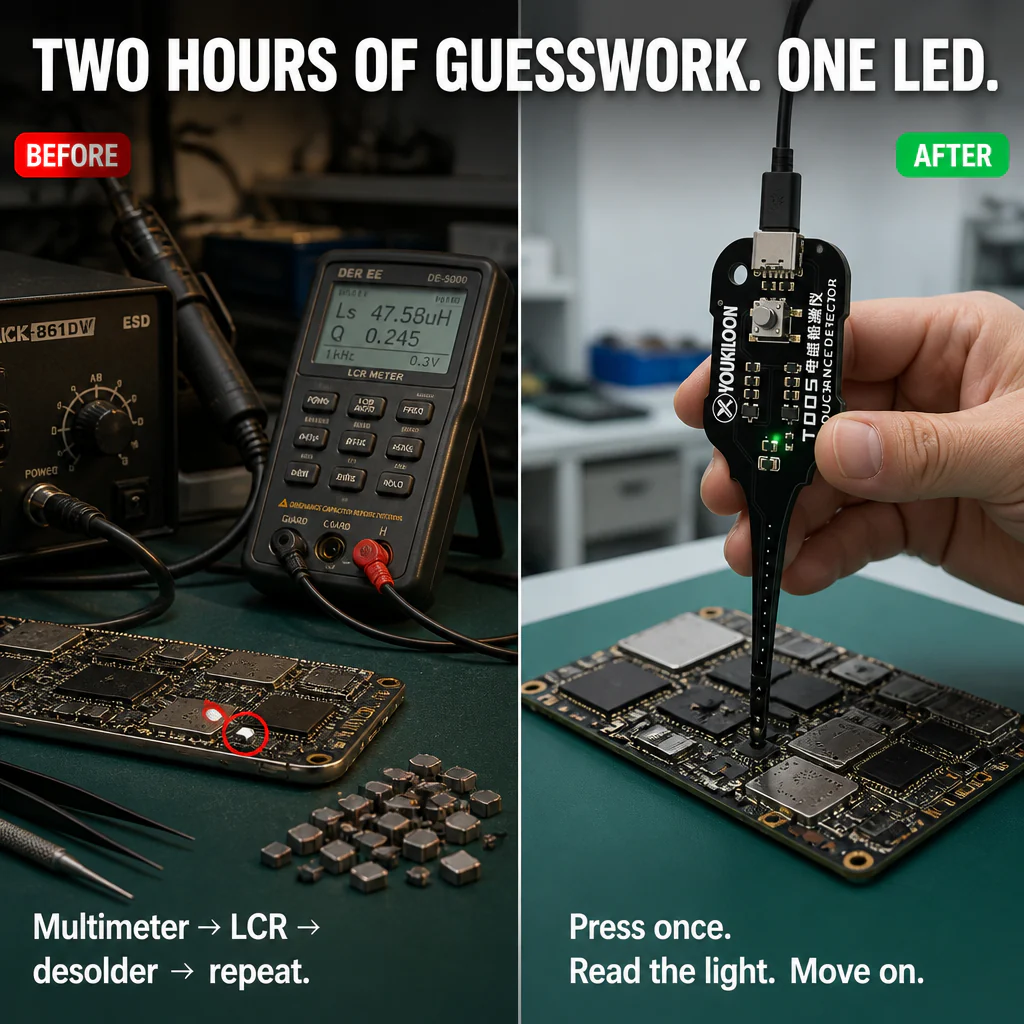
You've got a phone on the bench with a dead rail. Instead of desoldering one coil after another searching for the faulty one, CircuitSense™ detects the PCB via electromagnetic induction while all components remain in place. Press the button, watch the LED — a healthy inductor glows green, a dead one stays off. No removal, no guessing, no damaged pads.

Quit Wasting an Hour on Every Dead-Rail Diagnosis
You know the routine. A “won’t power on” device comes in. The multimeter offers no clues, the LCR meter requires coils out of circuit, and now you’re heating the iron chasing a fault that could be a few inductors away. Traditional tools leave you guessing. CircuitSense™ pinpoints the bad coil before you even touch the soldering iron.
➤ Test Live PCBs Without Desoldering: CircuitSense™ detects switching action on inductors while still soldered on the board. Avoid rework, protect pads, and keep the warranty seals intact.
➤ Just Watch the Green LED — That’s the Whole Process: A bright green glow signals the coil’s pulsing correctly. No light means you’ve found the culprit. No screens, no graphs, no fiddling with settings.
➤ Compatible with Phones, Laptops, and PC Motherboards: Designed for tiny SMD power coils on iPhone and Samsung boards, and larger chokes on laptops and consoles. One probe handles every common board you’ll encounter this week.

Why an LED Outperforms Your LCR Meter for On-Board Repairs
LCR meters gauge inductance values — handy at the bench, but unreliable on live boards where parallel components skew readings. CircuitSense™ bypasses this problem. Its sensor detects high-frequency switching pulses emitted by a functioning inductor. If the coil is active, the pulses are there. If it’s open or shorted, they vanish.
That’s why it reliably finds dead CPU rails, shorted VRMs, and missing gate-drive signals without touching a single part. You move quicker because you aren’t guessing — you see a clear yes-or-no reading right from the board.

Why Phone Repair Pros Grab CircuitSense™ First
Many technicians start doubtful — induction testing sounds too simple to trust. Then they try it on the next no-power sample and spot the bad coil before heating the soldering iron. The feedback is uniform: not a replacement for all tools, but the first you reach for on any power-rail fault.
“Thought it might be gimmicky. Tested it on a Galaxy board that wouldn’t boot and it flagged the dead inductor in under 60 seconds. Saved me an hour of hunting.” — Diego R., independent phone repair

Speed Up Diagnosis. Guard Your Boards. Stop Guessing on Power Rails.
✓ Test Inductors In-Circuit, Right Away: No desoldering, no parts removal, no damaged pads. Check components where they sit.
✓ Slash Power-Rail Troubleshooting From Hours to Minutes: Scan across suspects, watch the LED — finished before your iron heats.
✓ Designed for Your Daily Workbench: Compact PCB-style probe, one button, USB-C powered. Stays handy for every “won’t turn on” repair.
Find a Dead Coil in 3 Simple Steps
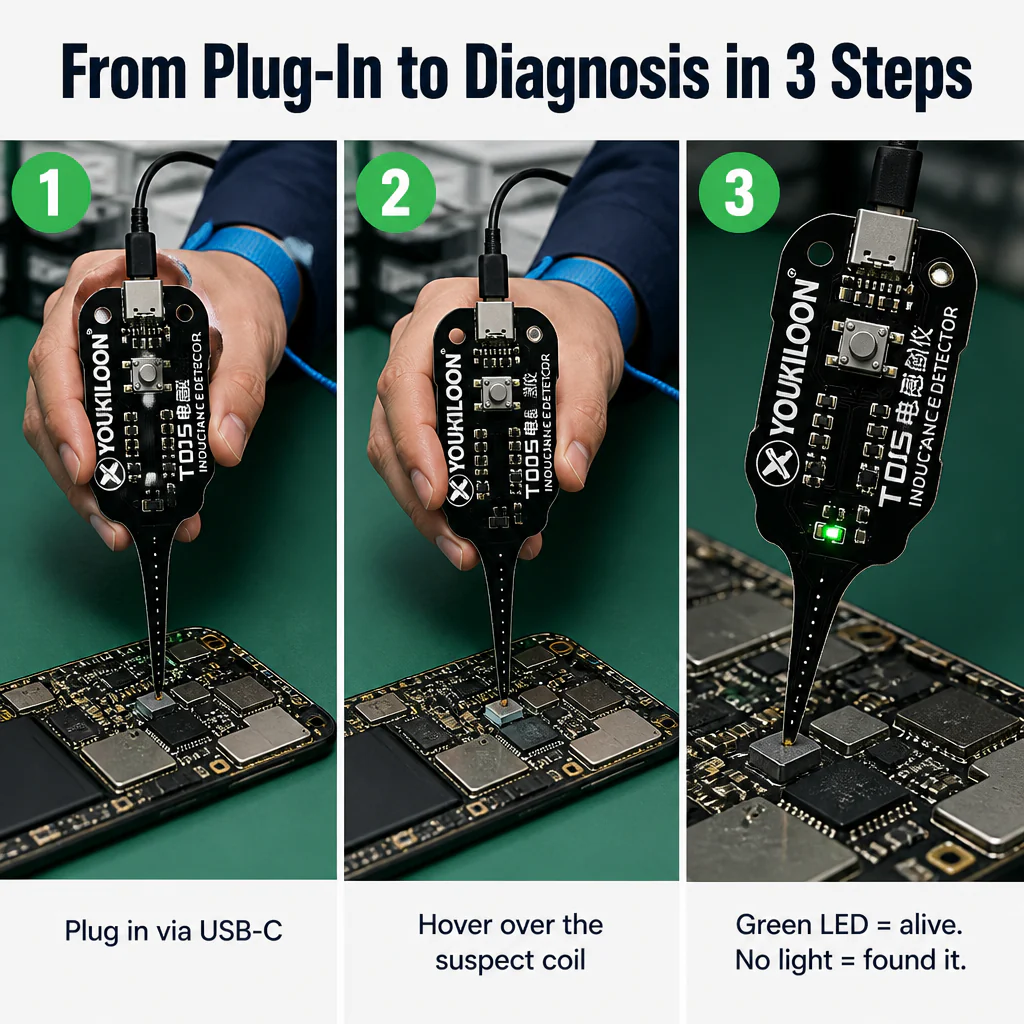
Step 1: Fully power down the board and discharge any large capacitors. CircuitSense™ senses switching pulses best on a powered-off board — safest and cleanest test.
Step 2: Connect CircuitSense™ to any USB-C power source — power bank, phone charger, or laptop port. Position the probe tip right over the inductor you want to check.
Step 3: Press the single button. A green LED means the coil is active. No light means you’ve found the fault — verify with a continuity test, then proceed to repair.

| Why CircuitSense™ Comes Out on Top | Multimeter + Desoldering | Bench LCR Meters |
|---|---|---|
| Tests Inductors In-Circuit, No Removal | ❌ Must desolder each suspect coil | ❌ Most require components to be removed |
| One Button — Green LED Shows Status | ❌ Multiple steps: probe, swap, retest | ❌ Measures values, not pass/fail live |
| Sized for SMD Power Coils on Phone Boards | ❌ Iron risks lifting pads on tiny parts | ❌ Made for bench measurement, not live in-circuit |
Key Specs You Should Know
- Color: Black PCB finish
- Dimensions: 1.4 × 3.5 × 0.5 inches (approx. 36 × 88 × 13 mm)
- Weight: 2.8 oz (80 g)
- Power: USB-C input (cable not included)
- Indicator: Single green status LED
- Compatibility: Phone, laptop, console, and PC motherboard inductors
Answers to Common Questions Before You Buy
Will it function on tiny SMD coils inside modern phones?
Absolutely. The probe tip is designed for SMD power inductors on phone boards — including iPhone, Samsung, Pixel, and similar models. Simply place the tip over the coil and read the LED.
Do I need to desolder the inductor first?
Not at all. That’s exactly the point. CircuitSense™ detects switching activity via electromagnetic induction while the coil stays soldered in place.
Can I test while the board is powered on?
Always power off the board first. Testing live can harm the device and provide unreliable results.
What powers the device?
USB-C. Use any phone charger, power bank, or laptop USB-C port. The USB-C cable is not included.
Are the readings dependable, or do I still need a multimeter?
A green light means the coil is pulsing and alive. No light usually indicates a dead, open, or shorted coil — always verify with a continuity check before replacing.
Is this device just for professionals, or can hobbyists use it too?
Both. Its single-button simplicity makes it approachable for hobbyists, while its in-circuit speed makes it essential for repair shops.

One Tool. Cleaner Diagnosis. Fewer Boards Damaged Chasing Dead Coils.
CircuitSense™ pays for itself the moment it spots a dead coil before you damage the pads trying to extract it. Add one to your bench kit. If it doesn’t become your go-to tool, return it — we’d rather refund than have it collect dust.
Original: $19.99
-70%$19.99
$6.00Product Information
Product Information
Shipping & Returns
Shipping & Returns
Description
Identify a Dead Inductor Instantly — No Need to Open the Board
You've got a phone on the bench with a dead rail. Instead of desoldering one coil after another searching for the faulty one, CircuitSense™ detects the PCB via electromagnetic induction while all components remain in place. Press the button, watch the LED — a healthy inductor glows green, a dead one stays off. No removal, no guessing, no damaged pads.
Quit Wasting an Hour on Every Dead-Rail Diagnosis
You know the routine. A “won’t power on” device comes in. The multimeter offers no clues, the LCR meter requires coils out of circuit, and now you’re heating the iron chasing a fault that could be a few inductors away. Traditional tools leave you guessing. CircuitSense™ pinpoints the bad coil before you even touch the soldering iron.
➤ Test Live PCBs Without Desoldering: CircuitSense™ detects switching action on inductors while still soldered on the board. Avoid rework, protect pads, and keep the warranty seals intact.
➤ Just Watch the Green LED — That’s the Whole Process: A bright green glow signals the coil’s pulsing correctly. No light means you’ve found the culprit. No screens, no graphs, no fiddling with settings.
➤ Compatible with Phones, Laptops, and PC Motherboards: Designed for tiny SMD power coils on iPhone and Samsung boards, and larger chokes on laptops and consoles. One probe handles every common board you’ll encounter this week.
Why an LED Outperforms Your LCR Meter for On-Board Repairs
LCR meters gauge inductance values — handy at the bench, but unreliable on live boards where parallel components skew readings. CircuitSense™ bypasses this problem. Its sensor detects high-frequency switching pulses emitted by a functioning inductor. If the coil is active, the pulses are there. If it’s open or shorted, they vanish.
That’s why it reliably finds dead CPU rails, shorted VRMs, and missing gate-drive signals without touching a single part. You move quicker because you aren’t guessing — you see a clear yes-or-no reading right from the board.
Why Phone Repair Pros Grab CircuitSense™ First
Many technicians start doubtful — induction testing sounds too simple to trust. Then they try it on the next no-power sample and spot the bad coil before heating the soldering iron. The feedback is uniform: not a replacement for all tools, but the first you reach for on any power-rail fault.
“Thought it might be gimmicky. Tested it on a Galaxy board that wouldn’t boot and it flagged the dead inductor in under 60 seconds. Saved me an hour of hunting.” — Diego R., independent phone repair
Speed Up Diagnosis. Guard Your Boards. Stop Guessing on Power Rails.
✓ Test Inductors In-Circuit, Right Away: No desoldering, no parts removal, no damaged pads. Check components where they sit.
✓ Slash Power-Rail Troubleshooting From Hours to Minutes: Scan across suspects, watch the LED — finished before your iron heats.
✓ Designed for Your Daily Workbench: Compact PCB-style probe, one button, USB-C powered. Stays handy for every “won’t turn on” repair.
Find a Dead Coil in 3 Simple Steps
Step 1: Fully power down the board and discharge any large capacitors. CircuitSense™ senses switching pulses best on a powered-off board — safest and cleanest test.
Step 2: Connect CircuitSense™ to any USB-C power source — power bank, phone charger, or laptop port. Position the probe tip right over the inductor you want to check.
Step 3: Press the single button. A green LED means the coil is active. No light means you’ve found the fault — verify with a continuity test, then proceed to repair.
| Why CircuitSense™ Comes Out on Top | Multimeter + Desoldering | Bench LCR Meters |
|---|---|---|
| Tests Inductors In-Circuit, No Removal | ❌ Must desolder each suspect coil | ❌ Most require components to be removed |
| One Button — Green LED Shows Status | ❌ Multiple steps: probe, swap, retest | ❌ Measures values, not pass/fail live |
| Sized for SMD Power Coils on Phone Boards | ❌ Iron risks lifting pads on tiny parts | ❌ Made for bench measurement, not live in-circuit |
Key Specs You Should Know
- Color: Black PCB finish
- Dimensions: 1.4 × 3.5 × 0.5 inches (approx. 36 × 88 × 13 mm)
- Weight: 2.8 oz (80 g)
- Power: USB-C input (cable not included)
- Indicator: Single green status LED
- Compatibility: Phone, laptop, console, and PC motherboard inductors
Answers to Common Questions Before You Buy
Will it function on tiny SMD coils inside modern phones?
Absolutely. The probe tip is designed for SMD power inductors on phone boards — including iPhone, Samsung, Pixel, and similar models. Simply place the tip over the coil and read the LED.
Do I need to desolder the inductor first?
Not at all. That’s exactly the point. CircuitSense™ detects switching activity via electromagnetic induction while the coil stays soldered in place.
Can I test while the board is powered on?
Always power off the board first. Testing live can harm the device and provide unreliable results.
What powers the device?
USB-C. Use any phone charger, power bank, or laptop USB-C port. The USB-C cable is not included.
Are the readings dependable, or do I still need a multimeter?
A green light means the coil is pulsing and alive. No light usually indicates a dead, open, or shorted coil — always verify with a continuity check before replacing.
Is this device just for professionals, or can hobbyists use it too?
Both. Its single-button simplicity makes it approachable for hobbyists, while its in-circuit speed makes it essential for repair shops.
One Tool. Cleaner Diagnosis. Fewer Boards Damaged Chasing Dead Coils.
CircuitSense™ pays for itself the moment it spots a dead coil before you damage the pads trying to extract it. Add one to your bench kit. If it doesn’t become your go-to tool, return it — we’d rather refund than have it collect dust.